การใช้ nrm
nrm เป็นเครื่องมือจัดการมิเรอร์สำหรับตัวจัดการแพ็กเกจ Node.js npm ช่วยให้คุณสลับระหว่างมิเรอร์ npm registry ต่างๆ ได้อย่างรวดเร็ว
หมายเหตุ: หลังจากสลับมิเรอร์แล้ว หากการติดตั้งช้าหรือล้มเหลว อาจเกิดจากปัญหาของมิเรอร์เฉพาะ! สลับไปยังมิเรอร์อื่นตามต้องการ
การติดตั้ง nrm ทั่วโลก
ตรวจสอบให้แน่ใจว่า Node.js ติดตั้งแล้วและ npm ทำงานอย่างถูกต้อง:
bash
npm install nrm -gNote
หากคุณใช้ nvm คุณจะต้องติดตั้ง nrm ใหม่หลังจากสลับเวอร์ชัน Node.js
คำสั่ง nrm ทั่วไป
bash
# ตรวจสอบเวอร์ชัน:
nrm -V

# ตรวจสอบเวอร์ชันและเส้นทางการติดตั้ง:
npm list -g nrm

# ดูรายการมิเรอร์:
nrm ls

# สลับไปยังมิเรอร์เฉพาะ:
nrm use <mirror-name>

# เพิ่มมิเรอร์:
nrm add <mirror-name> <mirror-url>
ตัวอย่าง: nrm add taobao https://registry.npmmirror.com/

# ลบมิเรอร์:
nrm del <mirror-name>
รายการมิเรอร์ nrm เริ่มต้น
bash
  npm ---------- https://registry.npmjs.org/
  yarn --------- https://registry.yarnpkg.com/
  tencent ------ https://mirrors.tencent.com/npm/
  cnpm --------- https://r.cnpmjs.org/
* taobao ------- https://registry.npmmirror.com/
  npmMirror ---- https://skimdb.npmjs.com/registry/
  huawei ------- https://repo.huaweicloud.com/repository/npm/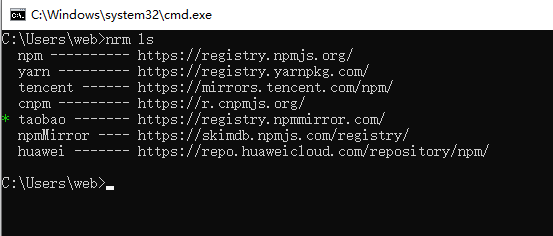
ปัญหาทั่วไปกับ nrm
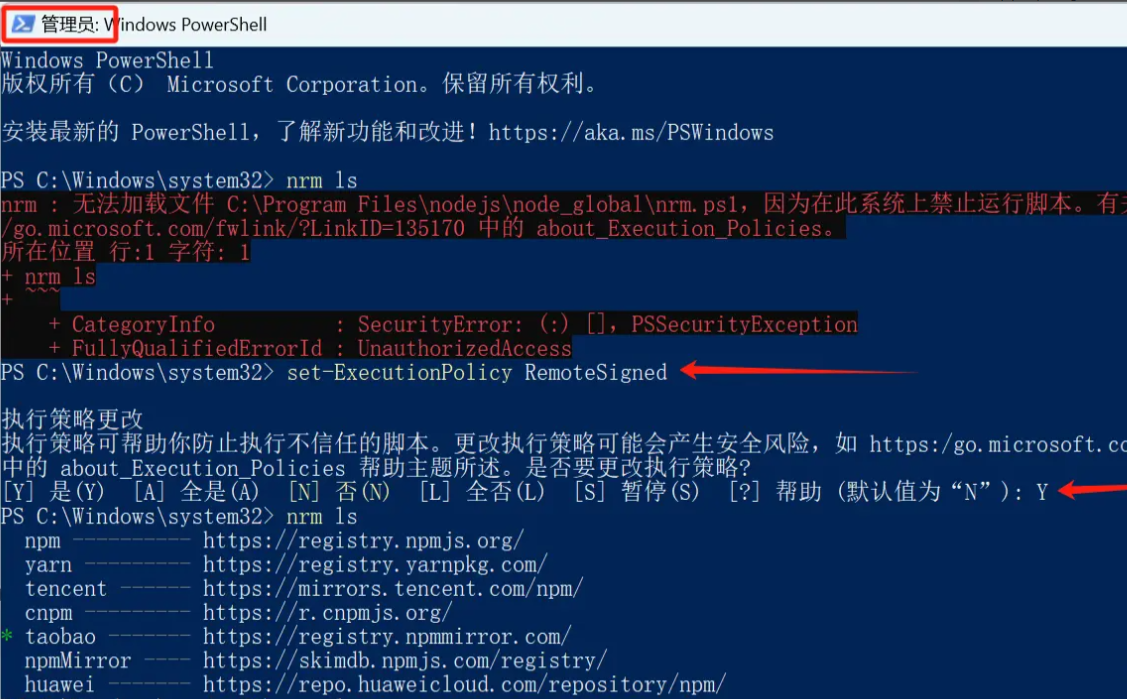
หากคุณพบข้อผิดพลาดเช่น: "Cannot load file C:\Program Files\nodejs\node_global\nrm.ps1, because running scripts is disabled on this system. For more information, see https:/go.microsoft.com/fwlink/?LinkID=135170 about_Execution_Policies."
วิธีแก้ไข: รัน cmd ในฐานะผู้ดูแลระบบและเปลี่ยนนโยบายการรันสคริปต์
- รัน
Start-Process powershell -Verb runAsใน PowerShell (รัน cmd ในฐานะผู้ดูแลระบบ) - รัน
set-ExecutionPolicy RemoteSignedและป้อน Y (เปลี่ยนนโยบายสคริปต์ที่เชื่อถือได้)